Purpose
The Camera Agent Web Server is a gateway application that runs on a device between your cameras and the cloud. It provides:
-
A Django web application with a browser UI for managing cameras.
-
A REST API (token-authenticated) for automation and integration.
-
Coordination with
vxg-proxy-clientprocesses that establish HTTP/RTSP (and SSH) tunnels from the gateway to cameras and from the gateway to cloud services.
The short repository description is: Python web server for Camera Agent proxy client.
Main components
|
Component |
Role |
|---|---|
|
Django app ( |
HTTP API, HTML UI, SQLite database ( |
|
Nginx ( |
Serves static files from a shared volume and reverse-proxies all other requests to Django. |
|
vxg-proxy-client |
Binary shipped inside the gateway image; started by |
|
SQLite |
Persists cameras, gateway UUID, and related data. |
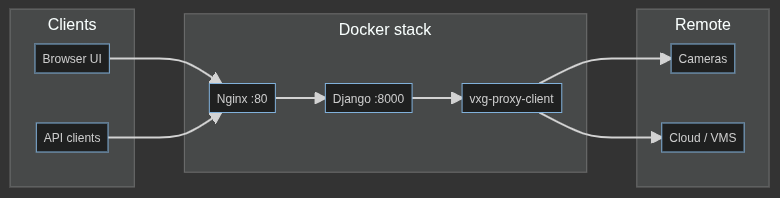
Data flow (simplified)
-
External access to the UI and API is normally on port 80 (nginx). The Django process listens on 8000 only inside the Docker network unless you publish that port separately for debugging.
-
Each active camera can have tunnels for HTTP and RTSP (or RTSP-only if configured). The main gateway tunnel exposes the gateway’s own HTTP and SSH endpoints to the cloud using the device UUID.
Repository layout (high level)
-
server/— Django project (app/) andgatewayapp (views, models, templates, API). -
docker/—docker-compose.yml, Dockerfiles for the app and nginx images. -
nginx/— Nginx image template config and entrypoint. -
package/— Version file, scripts used for packaged releases (image load,env_setup, start/stop). -
initialize_cameras.sh/restart_gateway.sh— Shell scripts used inside the app container to start or restartvxg-proxy-client.
For deployment specifics, see Gateway Deployment.