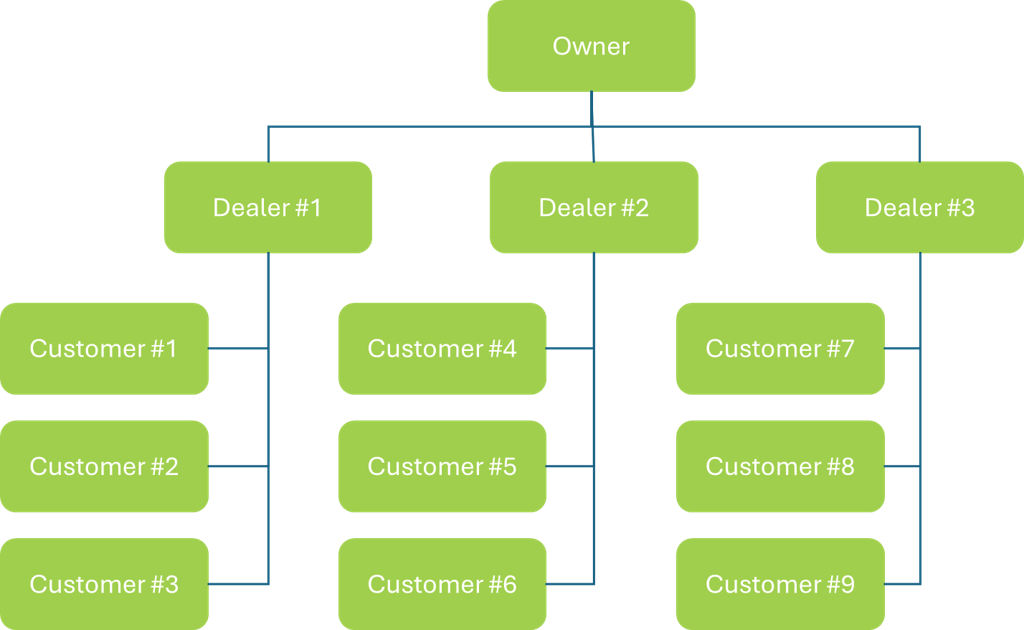
The service is organized in three company levels. A person signs in with a role that belongs to one of those companies. The home page and the sidebar follow that role.
Company levels
|
Level |
What it contains |
|---|---|
|
Owner |
The top company. It creates and manages dealers. |
|
Dealer |
A company under the owner. Each dealer has its own list of customers. |
|
Customer |
A company under one dealer. Customers use the service. Each customer has its own cameras, sites, alarms, and users. |
Roles
|
Role |
Company |
Home page |
|---|---|---|
|
Admin |
Owner |
The dealer list |
|
Partner |
Dealer |
The customer list |
|
Operator |
Customer |
Monitoring |
|
Auditor |
Customer |
Monitoring |
An Admin can add other Admins. A Partner can add other Partners. An Operator can add Operators and Auditors. An Auditor cannot add users. A customer company must keep at least one Operator.
Admin
An Admin works in the owner company.
-
Adds, updates, and removes dealers.
-
Adds and removes other Admins.
-
Assigns plans to dealers.
-
Opens Settings: Users, Auth settings, Plans, GenAI Parameters, and App Settings.
Partner
A Partner works in a dealer company.
-
Adds, updates, and removes that dealer’s customers.
-
Adds and removes other Partners.
-
Assigns plans to customers from the pool the dealer was given.
-
Opens Settings: Users and Auth settings.
Operator
An Operator works in a customer company and can change that customer’s setup.
The sidebar includes Monitoring, Health, Alarms, Search, Archive, and Dashboard.
Settings includes:
-
Cameras, including gateways, stream settings, and subscriptions
-
Alarms, including rules and faces
-
Sites
-
Users, including other Operators and Auditors
Auditor
An Auditor works in a customer company and is limited to the sites assigned to that user.
The sidebar includes Monitoring, Health, Alarms, Search, Archive, and Dashboard. Settings is not available, so an Auditor cannot change cameras, sites, alarm rules, or users.
On the assigned sites, an Auditor can:
-
Watch live and recorded video
-
Open health events
-
Review alarms and events
-
Open archived clips
-
Use search when Investigator Permissions is turned on for that user
-
Control pan, tilt, and zoom when Allow PTZ is turned on for that user